 Documentation
 Install the site script
Install the official loader snippet before the closing </body> tag:
<script type="text/javascript" id="convertmax_min">
  (function(w, d) {
    var e = d.createElement("script");
    e.type = "text/javascript";
    e.async = false;
    e.src =
      (d.location.protocol == "https:" ? "https" : "http") +
      "://cdn.convertmax.io/cm_v1.min.js";
    var s = d.getElementById("convertmax_min");
    s.parentNode.insertBefore(e, s);
    w.__convertmax_q = w.__convertmax_q || [];
    w.Convertmax = w.Convertmax || function() {
      w.__convertmax_q.push(arguments);
    };
  })(window, document);

  window.addEventListener("convertmaxLoaded", function() {
    Convertmax.config({
      apiKey: "YOUR_API_KEY",
      eventURL: "https://event.convertmax.io",
      debug: true
    });
  });
</script>
Send baseline events
After script load, track at least a page view and one conversion path event:
<script>
  if (window.Convertmax) {
    window.Convertmax.track("page_view", {});
  }
</script>
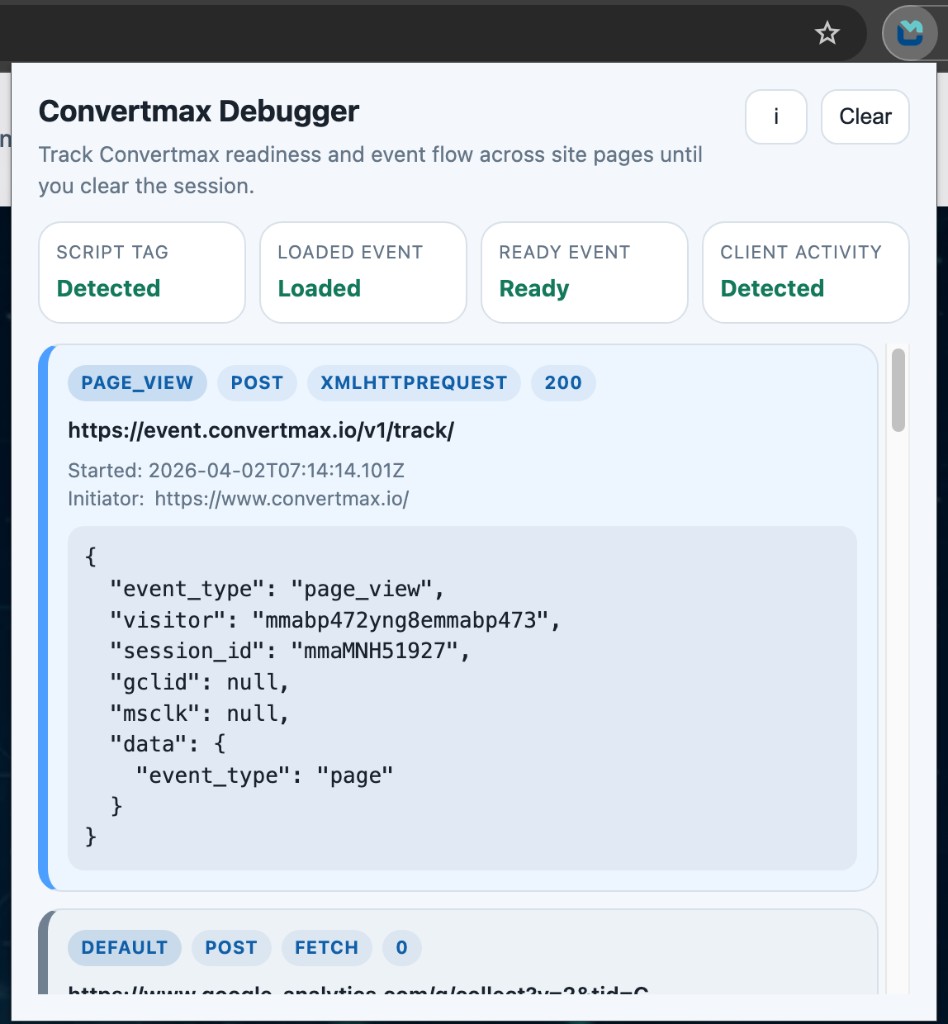
Verify the install
After loading the page:
- confirm the script is requested successfully
- confirm a
page_viewevent is emitted - trigger one tracked event such as
click,add_cart, orconvert - confirm event requests are sent to
https://event.convertmax.io
You can validate runtime signals and captured requests with the Convertmax Chrome Extension.
Implementation note
Use stable IDs and event properties that describe business concepts, not design revisions. For example, product_id and quote_id are better than UI-only labels.