 Documentation
This guide focuses on the current browser install: cm_v2.min.js.
Use this path when you want the fastest direct install on any site without bundling an SDK.
Install the v2 browser script
Add the async loader before the closing </body> tag:
<script type="text/javascript" id="convertmax_loader">
  (function(w, d) {
    var e = d.createElement("script");
    e.type = "text/javascript";
    e.async = true;
    e.src = "https://cdn.convertmax.io/cm_v2.min.js";
    var s = d.getElementById("convertmax_loader");
    s.parentNode.insertBefore(e, s);
    w.__convertmax_q = w.__convertmax_q || [];
    w.Convertmax = w.Convertmax || function() {
      w.__convertmax_q.push(arguments);
    };
  })(window, document);

  window.addEventListener("convertmaxLoaded", function() {
    window.Convertmax.config({
      apiKey: "YOUR_API_KEY",
      eventURL: "https://event.convertmax.io",
      debug: false,
      autoPage: true
    });
  });
</script>
What v2 changes
- loads asynchronously from
https://cdn.convertmax.io/cm_v2.min.js - keeps the familiar
window.Convertmaxglobal - sends events with browser
fetch(..., { keepalive: true }) - supports automatic page tracking with
autoPage: true - emits both
convertmaxLoadedandconvertmaxReadybrowser events
Recommended initial config
Start with:
apiKeyset to your Convertmax API keyeventURLset tohttps://event.convertmax.iounless you are using a branded tracking hostautoPage: trueso the script sends the firstpage_viewautomaticallydebug: truetemporarily if you want console visibility during setup
Send a custom event
With autoPage: true, you do not need to manually fire the initial page view. After the script is ready, send the next meaningful event in your flow:
<script>
  window.addEventListener("convertmaxReady", function() {
    window.Convertmax.track("click", {
      target: "hero_cta",
      page: window.location.href
    });
  });
</script>
Other v2 browser methods
The v2 script also supports:
Convertmax.identify(userId, traits)Convertmax.page(name, properties)Convertmax.group(groupId, traits)Convertmax.alias(userId)Convertmax.addClickTracking(selector)Convertmax.optoutTracking()Convertmax.optinTracking()Convertmax.reset()
Verify the install
After loading the page:
- confirm
https://cdn.convertmax.io/cm_v2.min.jsloads successfully - confirm
convertmaxLoadedfires andConvertmax.config(...)runs - confirm a
page_viewevent is sent automatically whenautoPage: trueis enabled - trigger one custom event such as
click,add_cart, orconvert - confirm event requests are sent to your tracking endpoint
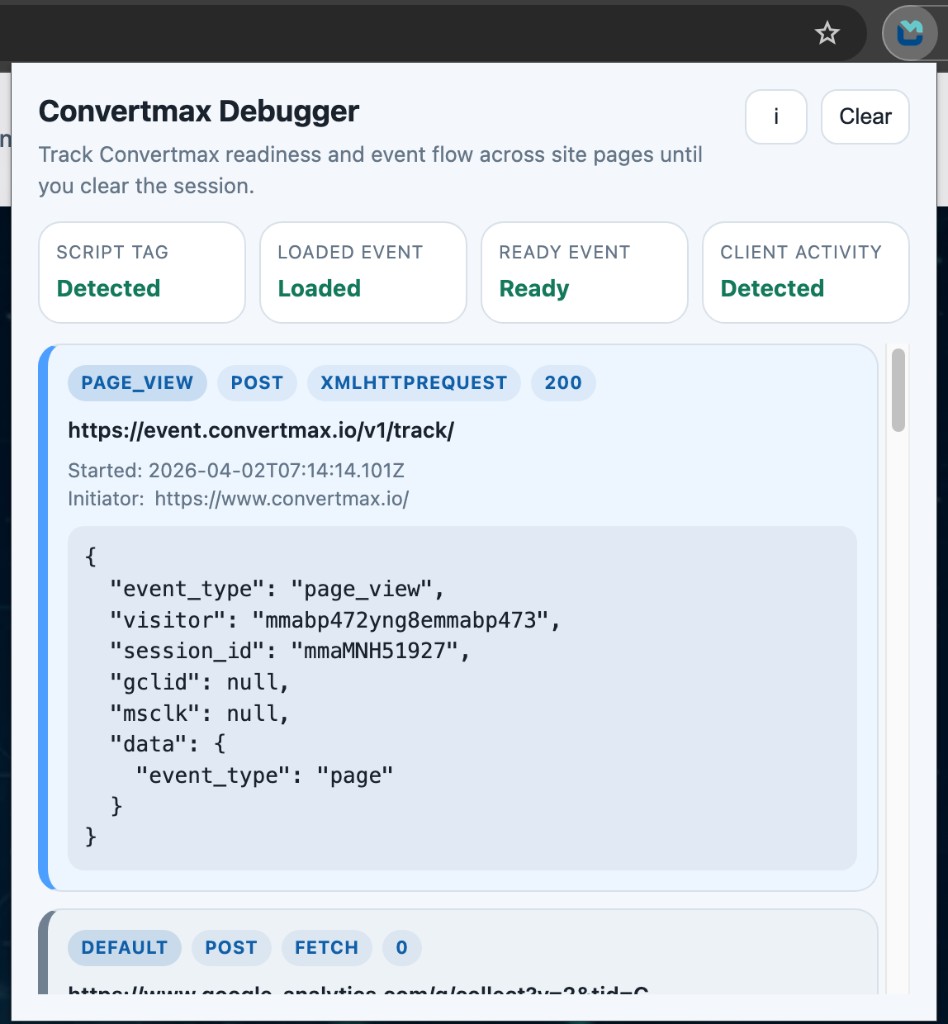
You can validate runtime signals and captured requests with the Convertmax Chrome Extension.
When to use another install path
- use
NPM Packageif you want Convertmax inside a bundled JavaScript or Node.js app - use
React SDKif you want React-friendly providers and hooks - use the native mobile SDKs for Android and iOS apps
Implementation note
Use stable IDs and event properties that describe business concepts, not design revisions. For example, product_id and quote_id are better than UI-only labels.