Category clarity
Convertmax vs CRM: What’s the Difference, and Do You Need Both?
A CRM is your operational system of record for relationships, pipeline, and sales activity. Convertmax is a revenue-intelligence and attribution layer that joins first-party journeys, ads, calls, CRM outcomes, and closed revenue—without replacing HubSpot, Salesforce, GoHighLevel, or Close.
- Keep your CRM as the place the team works deals and relationship history
- Join ads, site journeys, forms, calls, CRM outcomes, and closed revenue in one view
- Answer “what is making us money?” when platform totals and CRM reports disagree
Convertmax is not a CRM. It joins journeys, calls, ads, CRM outcomes, and closed revenue so you can see what actually made money.
If your question is “which CRM should we buy?”, this page is not that decision. If your question is “why don’t our CRM reports explain marketing revenue?”, you are in the right place.
Decision table
CRM vs Convertmax at a glance
Convertmax is not a CRM. It does not replace HubSpot, Salesforce, GoHighLevel, or Close. Most teams that need Convertmax already have a CRM — and keep it.
| Question | CRM | Convertmax |
|---|---|---|
| Is it a CRM? | Yes | No |
| Does it replace HubSpot / Salesforce / GoHighLevel? | N/A — it is that class of tool | No |
| Core job | Manage people, pipeline stages, tasks, and relationship history | Join journeys across ads, site, calls, CRM, and closed revenue |
| Typical “source of truth” for | Sales process and customer records | What marketing and revenue activity connected to outcomes |
| Why use both? | Team needs a place to work deals | Team needs a credible answer to “what is making us money?” across systems |
| Who it is for | Any team running a sales process | B2B, agencies, and high-consideration / call-heavy teams whose journey does not end at a form |
Keep the CRM
When a CRM alone is enough
A CRM can be enough when reporting does not need to join ads, site journeys, and calls to closed revenue. In those cases, adding another reporting layer is optional. Keep the CRM. Run the business.
- Almost all demand arrives already known (referrals, outbound lists, partners)
- Marketing spend is small or not being optimized by channel
- Sales works one clear pipeline and nobody is arguing about which campaigns created customers
- Calls, ads, and website journeys are not material to budget decisions
- “Lead source” as a single field is good enough for how the business actually decides
Add the join
When you need the join
The CRM still runs the relationship. Convertmax connects the path that created the revenue. For how Convertmax stays CRM-agnostic on purpose, see Why Convertmax Is CRM Agnostic.
- Ads, website, forms, calls, CRM, and billing each hold part of the story
- Lead volume looks healthy while closed revenue does not
- Platform conversion totals disagree with CRM and finance
- Phone calls are a real sales path and fall out of web-only reporting
- Pre-lead research (anonymous visits, return paths) disappears before the CRM record exists
- You need multi-touch context without pretending the CRM dropdown is the full journey
- Agencies must defend spend with outcomes, not only activity
Architecture
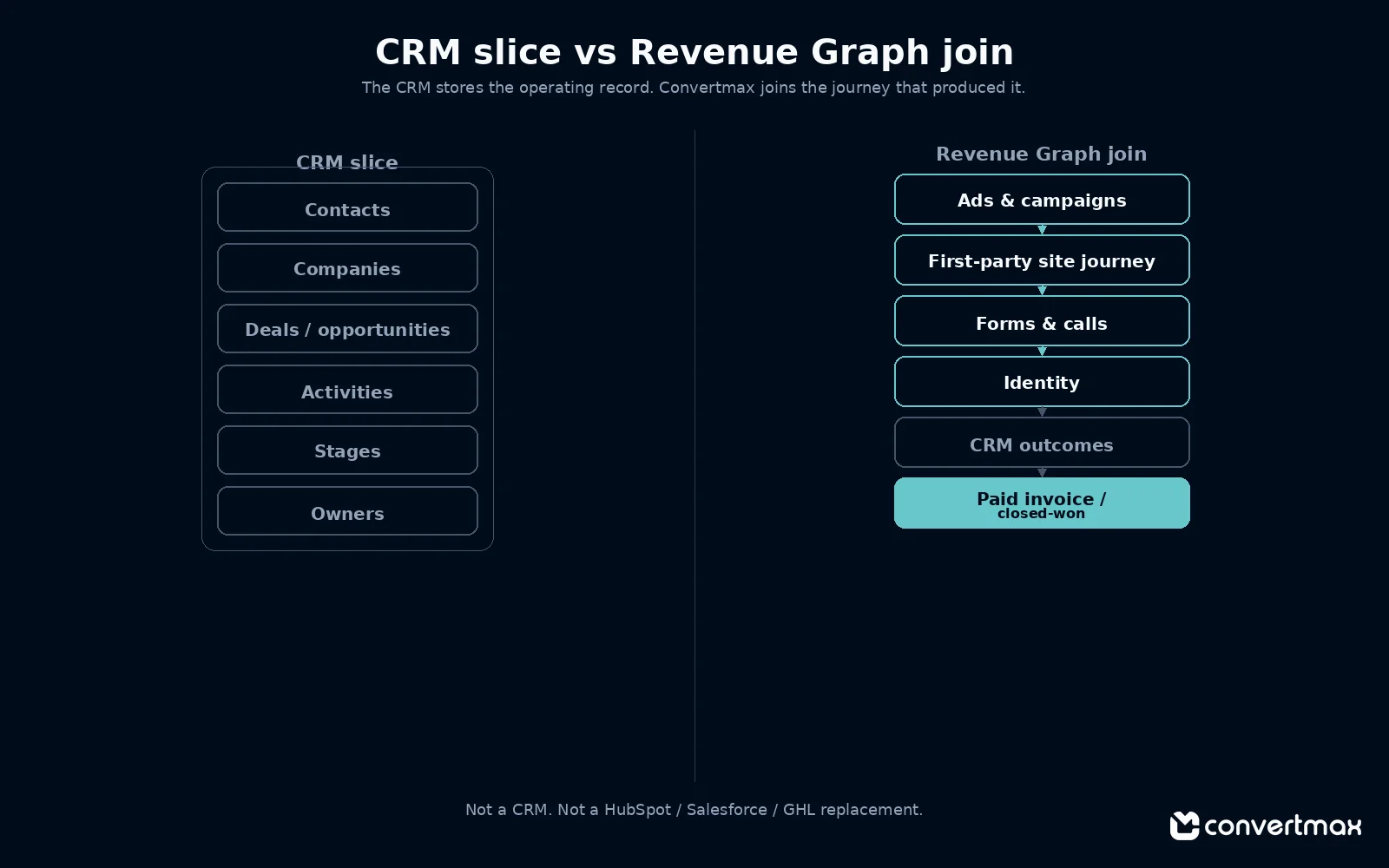
Operating record vs Revenue Graph join
CRM slice = where the team works the relationship. Revenue Graph join = how Convertmax connects pre-CRM and post-CRM evidence to closed revenue without taking over the CRM. Live CRM-ish connectors today include HubSpot, HighLevel, Close, and Pipedrive — see Integrations for current coverage. Convertmax is not a Salesforce replacement and does not claim a live Salesforce connector here.
Product context: Platform · Integrations.
Use cases
Where teams keep the CRM and add Convertmax
Use case 1
B2B team with a working CRM and messy marketing proof
Sales lives in the CRM. Marketing cannot show which campaigns created accepted opportunities and closed-won deals. Convertmax joins ads, site journeys, and CRM outcomes so budget talks use the same commercial definitions.
Use case 2
Agency reporting to a client who already has HubSpot, Salesforce, or GoHighLevel
The client will not rip out their CRM. They need reporting that survives “which leads became revenue?” Convertmax sits beside the CRM and call tools; it does not ask the client to migrate pipeline operations.
Use case 3
Call-heavy / high-consideration offers
Quotes, demos, and phone paths matter. A form-only or CRM-only view understates the journey. Convertmax keeps calls in the same join as CRM stages and closed revenue.
Related entry point when live: lead attribution software.
Use case 4
Stack with more than one “almost CRM”
Marketing in one system, sales in another, billing elsewhere. Convertmax is built for that multi-system reality rather than forcing one CRM to own every upstream touch.
Boundaries
What Convertmax is not
Clear category lines matter. Convertmax sits beside the CRM as a revenue-intelligence and attribution layer — not as another place to run pipeline.
- Not a CRM
- Not a HubSpot replacement
- Not a Salesforce replacement
- Not a GoHighLevel replacement
- Not a claim of universal CRM coverage for every product on earth — see Integrations for what is connected today
- Not a pitch that a CRM Lead Source field is useless — it is incomplete for journey-level revenue questions
Decision
Do you need both?
Yes, when
You already run sales in a CRM and you also need to join marketing, calls, and closed revenue into one credible view.
No CRM replacement required
Keep the system of record. Add the join where the reports break.
FAQ
Convertmax vs CRM questions
Category clarity for teams that already have a CRM and still cannot explain marketing revenue.
Is Convertmax a CRM?
No. A CRM is the operational system of record for relationships, pipeline, and sales activity. Convertmax is a revenue-intelligence and attribution layer that joins first-party journeys, ads, calls, CRM outcomes, and closed revenue so you can see what actually made money.
Does Convertmax replace HubSpot, Salesforce, or GoHighLevel?
No. Convertmax does not replace HubSpot, Salesforce, GoHighLevel, or Close. Most teams that need Convertmax already have a CRM and keep it as the place the team works deals.
Do I need both a CRM and Convertmax?
Yes when you already run sales in a CRM and also need to join marketing, calls, and closed revenue into one credible view. Keep the CRM as the system of record and add Convertmax where platform totals and CRM reports disagree.
Does Convertmax have a live Salesforce connector?
Convertmax is not a Salesforce replacement and does not claim a live Salesforce connector on this page. Live CRM-ish connectors today include HubSpot, HighLevel, Close, and Pipedrive. See the Integrations page for current coverage.
When is a CRM alone enough?
A CRM alone can be enough when demand is mostly known referrals or outbound, marketing spend is not being optimized by channel, calls and website journeys are not material to budget decisions, and a single Lead Source field is good enough for how the business decides.
Start with a diagnostic
Category-confused? Audit the stack first.
Get a free Attribution Accuracy Audit to see where tracking and attribution break across your current CRM, ads, calls, and revenue systems — or request a demo if you already know you need the Revenue Graph beside your CRM.