By Elena Marsh
Why Shopify Orders Never Match Google Ads Conversions
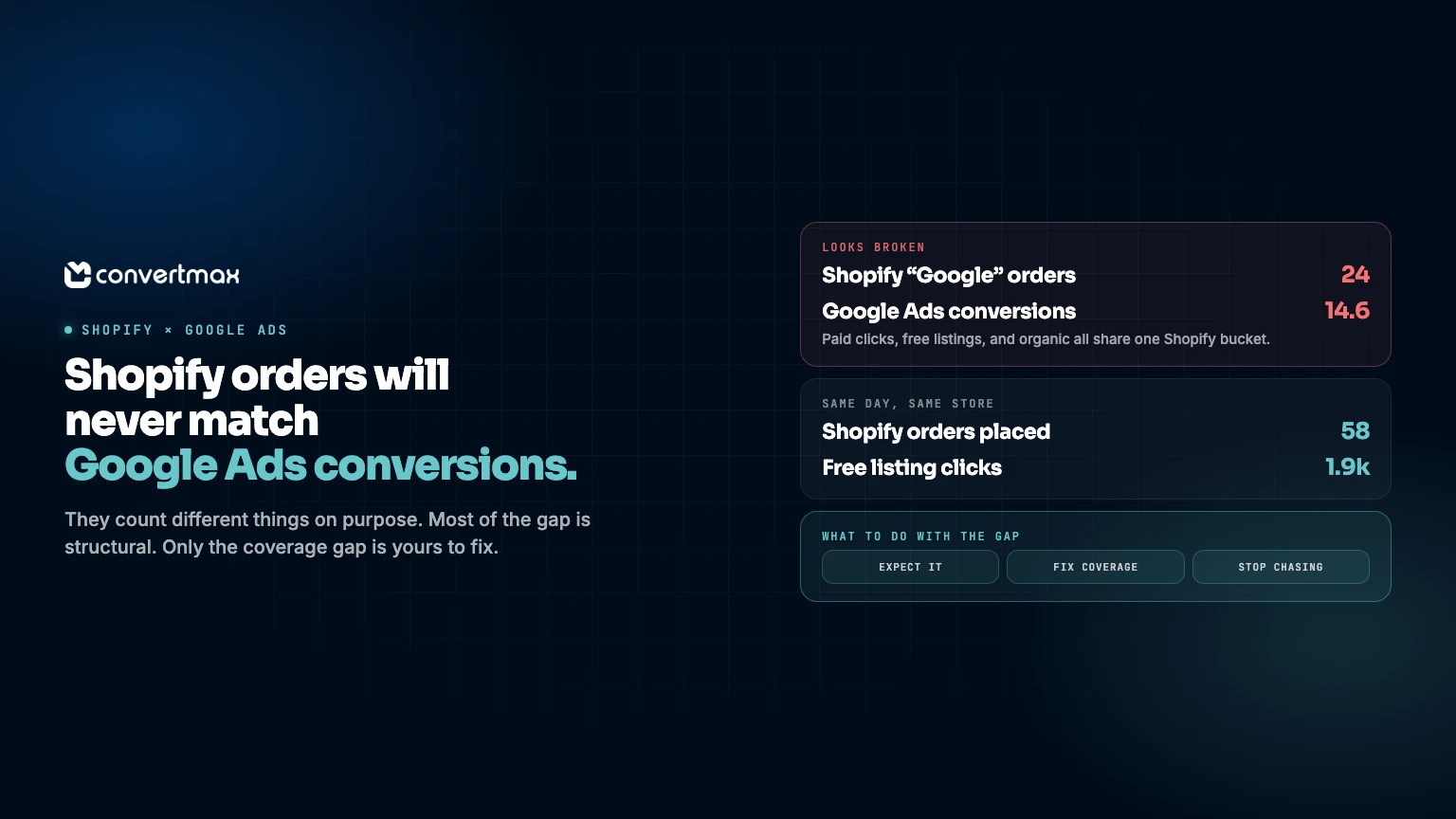
Your store says 58 orders. Google Ads says 14.6 conversions. Neither number is wrong.
Shopify counts orders placed in your store. Google Ads counts purchases it can tie back to a billable ad click. Those are two different questions, so they get two different answers. Most of the difference is built in on purpose.
Knowing which gap you're staring at is the entire skill here, because a slice of it is worth fixing and the rest will eat your afternoon for nothing.
Almost nobody starts there. They start by assuming a broken pixel.
Shopify counts a channel. Google Ads counts a billable click.
This one explains most of the gap, and it's why Shopify nearly always reports more "Google" revenue than Google Ads reports conversions.
Shopify's marketing reports assign every order to a channel using referrer and UTM data, credited to the last non-direct channel the shopper touched. That label comes from where the visit arrived from. Not from whether anybody paid for it. An organic search click, a free product listing in Merchant Center, and a paid Shopping click can all show up carrying a Google source, and Shopify drops all three into the same Google bucket.
Google Ads plays a narrower game. It records a conversion only when it can connect the purchase to a billable ad click, normally through a Google click ID captured when the click happened and read back at conversion time. An order from organic search or a free listing has no paid click behind it. Google Ads counts zero. Correctly. Shopify counts it as a Google sale. Also correctly.
Run Shopping campaigns with free listings on and this is where your gap lives. Merchant Center reports free listing traffic as organic performance, tracked separately from paid Shopping. It never becomes a Google Ads conversion. No budget paid for it.
Want to see how much of your Google revenue never touched an ad? Open Merchant Center and look at the organic versus paid split, then compare google / organic against google / cpc in GA4 under Reports > Acquisition > Traffic acquisition.
If you're already treating GA4 as your source of truth, that's a third set of counting rules on top of the first two. Why Google Analytics is no longer enough walks through where it diverges.
The two systems date the same order differently
Monthly totals can roughly agree while any single day looks like a disaster. Both platforms anchor the same purchase to different dates.
Google Ads files a conversion against the date of the ad click, not the date of the order. Someone clicks your ad on Tuesday and buys the following Monday, and Google Ads books both the click and the conversion under that Tuesday. The default click-through window runs 30 days. Depending on your settings, conversions can be reported up to 90 days after the click, which means Google keeps revising recent days as late conversions trickle in.
Shopify books the sale on the day the order was placed.
Same order, two dates, two tools. Pull one day and Google Ads looks weak, because some of that day's orders got credited back to earlier click dates while Shopify counts them today. Widen the range to a full conversion window before you judge anything.
Google's own help docs suggest ending your report range at least 30 days in the past for exactly this reason. There's also a Days to conversion segment under Campaigns that shows the real delay distribution in your account. Worth running once. It usually surprises people.
The coverage problem: paid clicks that should have counted
This is the gap worth fixing, and the one merchants misdiagnose most often.
A conversion needs an identifier. Usually that's a stored click ID, so gclid, gbraid, or wbraid. Lose the click ID before checkout and Google has nothing to match the order against, unless enhanced conversions are switched on.
Click IDs go missing for dull, mechanical reasons:
- Checkout runs on a different domain or subdomain than the storefront, so the cookie holding the click ID doesn't survive the hop.
- Shop Pay or PayPal bounce the shopper through their own domain mid-checkout, and the cookie is gone before the order completes.
- An ad blocker or a strict browser privacy setting kills the tag outright.
- Consent Mode gets no consent signal to work with, so the ping fires without the identifiers Google needs.
- The tag fires on some templates and not others. Google support has diagnosed stores where the click ID survived on a collection page but vanished on the homepage because session start parameters weren't firing.
Enhanced conversions closes part of that. It sends hashed first-party customer data (email, phone, name, address) so Google can match an order to a signed-in account that engaged with an ad even when the click ID is gone. Google's requirements are specific: SHA-256 after normalization, meaning trim whitespace, lowercase, format phone numbers to E.164, and strip the periods before gmail.com.
If you're on the Google & YouTube app, you can turn this on under Settings > Google Ads settings. The app also sends transaction IDs with its conversions, which matters for the next part.
Worth being honest about the ceiling here. Enhanced conversions patches a gap in coverage, it doesn't rebuild the foundation. What you collect first-party determines how much of your traffic was ever measurable.
Duplicates push the other way
Some stores have the reverse problem. Google Ads reports more conversions than the store has orders.
Almost always, two things are counting the same purchase. Google's own setup guidance for the Google & YouTube app is blunt about it: check that you don't have duplicate tags when conversions exist in both the app and a theme or custom pixel, set the app conversion as primary, and remove legacy tags.
The mechanics are worth knowing. Google Ads deduplicates conversions sharing the same conversion action and the same transaction ID. Shopify's app passes transaction IDs automatically. So if you also fire a manual tag or run a second tracking app, the IDs won't match across both sources and Google treats them as separate conversions. Small things break it too. A different prefix, a suffix, one stray space.
Then there's the setting everyone confuses with transaction IDs. The Count setting on a conversion action decides whether Google counts every conversion after a click or just one per click. Setting it to One doesn't deduplicate a single order reported twice. It suppresses genuine repeat purchases. For purchase tracking, use the transaction ID.
One limitation: transaction IDs don't resolve duplicate view-through conversions. Nothing does, really.
The revenue never matches either
Sometimes the counts line up and the money doesn't. That's a definition problem, not a tracking problem.
Shopify defines revenue three ways in the same reports. Gross sales are price times quantity before taxes, shipping, discounts, and sales reversals, and they include pending, unpaid, and canceled orders. Net sales subtract discounts and sales reversals. Total sales add taxes, duties, shipping, and fees back on. Grab the wrong one and you're comparing two different numbers that share a label.
Google Ads conversion values come from whatever the tag passed, which often includes tax and shipping. Returns don't reduce them. Refunds don't flow back on their own.
Google does offer conversion adjustments. Restate changes the value without touching the count. Retract removes the conversion and zeroes the value. You get roughly seven days after a conversion is recorded before automated bidding stops reading your adjustments.
So a store running a 9 percent return rate overstates Google Ads revenue against its own net sales every month until somebody uploads adjustments.
Don't expect whole numbers
Two mechanics guarantee the conversion column will never be a clean integer.
Modeled conversions estimate purchases Google can't observe directly. Data-driven attribution then splits fractional credit across the interactions in a path, so one conversion shows up as a decimal against any single campaign or keyword. A campaign reporting 84.3 conversions is fine.
That's a decent dividing line. Need a clean order count? Read Shopify. Need to know which clicks earned the sale? Read Google Ads and accept the modeling.
A worked example
One day at a store doing about $40,000 a month, running Shopping with free listings.
| Source | Number | What it's actually counting |
|---|---|---|
| Shopify orders | 58 | Orders placed that day, gross sales basis |
| Shopify "Google" channel orders | 24 | Every order with a Google referrer, paid or not |
| Google Ads conversions | 14.6 | Paid clicks only, dated by click date, modeled |
| Merchant Center organic (free listings) | 1,900 clicks | Never counted as a Google Ads conversion |
| Google Ads conversions after refunds | 13.1 | Only if someone uploads adjustments |
That 24 versus 14.6 looks alarming. Take it apart and most of it is structural: free listing orders and organic Google orders that Shopify labels Google and Google Ads never claims. What's left is genuine coverage loss on paid clicks. That's the only part with a fix attached to it.
What to fix, what to leave alone
| Gap | Cause | Action |
|---|---|---|
| Shopify "Google" sales missing from Google Ads | Free listings or organic clicks, no paid ad behind them | Confirm the split in Merchant Center. Expected. Leave it. |
| Paid click that should have counted but didn't | Missing click ID, blocked tag, cross-domain hop, consent | Enable enhanced conversions, send conversions server-side from the order webhook |
| Conversion lands on a different day in each tool | Google dates by click, Shopify dates by order | Compare over a full conversion window, never day by day |
| Google Ads revenue above net sales | Refunds never adjusted | Upload conversion adjustments for returns |
| Fractional conversion counts | Modeled conversions, fractional credit | Accept it. Read Shopify for order counts. |
| Google Ads reports more conversions than orders | Duplicate tags: the app plus a manual pixel | Keep one source, set the app conversion as primary, remove legacy tags |
Where Convertmax fits
The fixable gap is a pipeline problem. A browser tag that fires when it feels like firing will always drop paid clicks, and no dashboard brings them back.
Convertmax ties first-party storefront visits to completed orders so campaign and session context survives checkout, then reports revenue on the same model as the rest of your stack. It can send qualified conversions back to Google Ads and Meta with hashed customer data, which means the platform optimizes toward revenue instead of toward an early signal that never pays out.
For ecommerce teams, the storefront feeds the same first-party attribution model as your CRM, calls, and billing data. The monthly reconciliation spreadsheet stops being a job.
Convertmax for Ecommerce Teams has the storefront and reporting detail if you want to see how that connection actually works.
If you've been staring at these two numbers for a while, start with the question that actually matters. Which gap is costing you money? Request a demo or run the free audit.
FAQ
Why does Google Ads show fewer conversions than Shopify?
Because Shopify counts every order with a Google referrer as a Google sale, organic search and free listings included, while Google Ads counts only purchases tied to a paid ad click. Free Shopping listings are the biggest single cause.
Are free Google Shopping listings counted in Google Ads?
No. Merchant Center reports them as organic performance and they never appear as Google Ads conversions, even though Shopify labels the resulting orders as Google.
Why is my Google Ads conversion number a decimal?
Modeled conversions estimate purchases Google can't observe, and data-driven attribution splits fractional credit across touchpoints. 84.3 conversions on a campaign is normal.
Does a transaction ID stop double counting?
It stops the same order being counted twice against the same conversion action. It won't stop duplicate tags from separate sources, and it won't fix duplicate view-through conversions.
Should I reconcile Google Ads to Shopify at all?
Reconcile across a full conversion window and expect a gap. Shopify for order counts and revenue truth. Google Ads for which clicks earned the sale.
---
Stores burn months trying to force these two numbers into agreement. They were never built to agree. Spend that time on the coverage gap instead, because it's the only part of the difference that's actually your money walking out the door.