By Elena Marsh
How We Map GSC Data to Realized Revenue
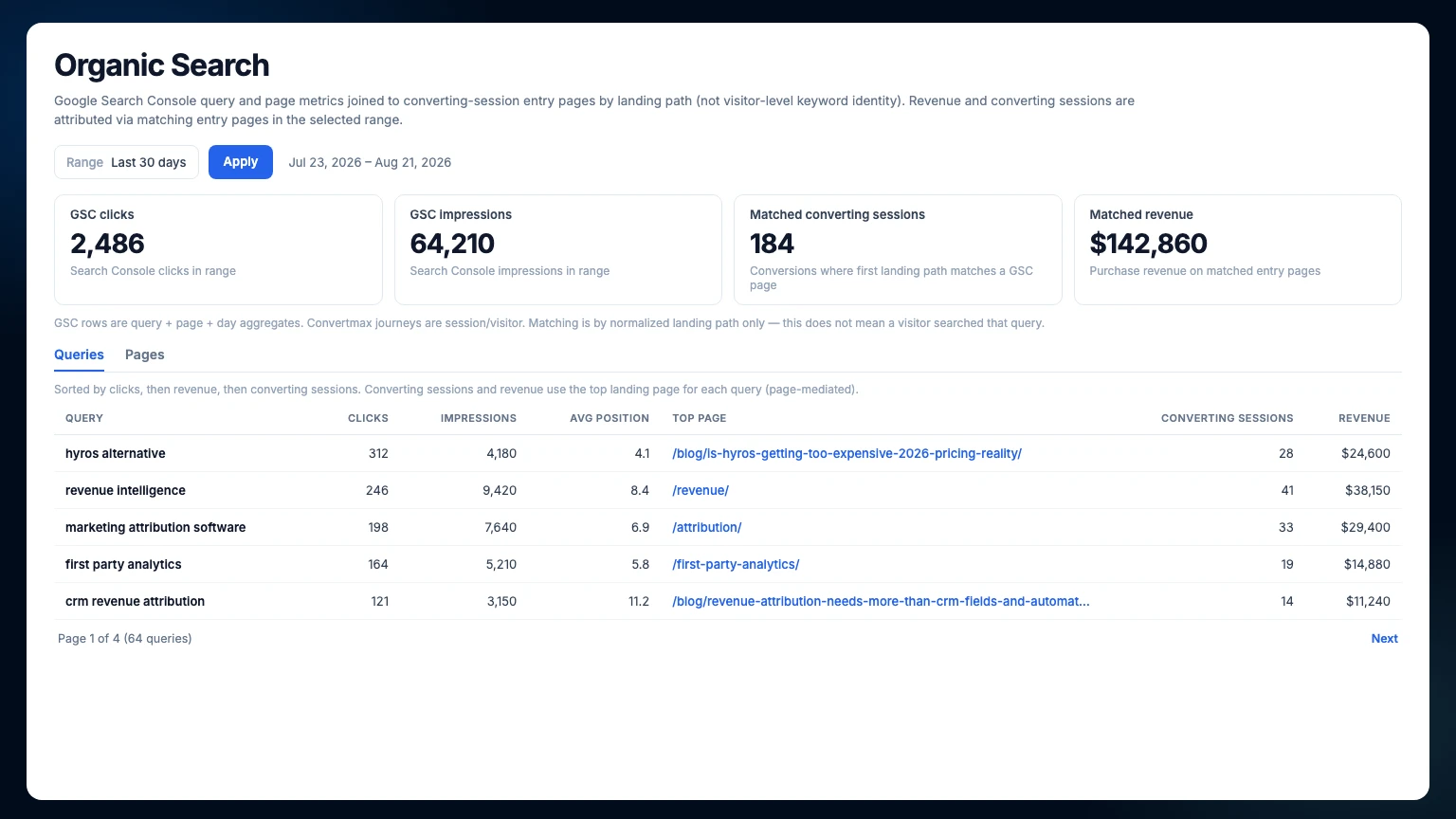
A familiar problem for SEO and growth teams: Google Search Console says what people are searching for and which pages appear in results. Convertmax says which landing pages convert and produce realized revenue. Both answers matter. But they have usually lived in separate tools, which means someone ends up exporting CSVs, lining up URLs, and trying to turn two partial pictures into a decision.
We built Organic Search Report to map GSC data to that revenue.
The new report brings Google Search Console query and page data into Convertmax and matches it to converting landing paths. It gives your team a clearer way to judge organic work: which pages are earning visibility, which of those pages are producing customers, and where a little more work may be worth it.
Search visibility is only half the story
Impressions, clicks, and average position are useful. They tell you whether Google is showing your pages and whether searchers are responding. They do not, on their own, tell you whether a page is a valuable front door to the business.
That distinction matters when you are choosing what to do next. A page with modest search traffic might consistently bring in customers. Another page may earn plenty of clicks but contribute little after the visit. If all you can see is traffic, those two pages can look more similar than they are.
Organic Search puts the missing context beside the search data. Now you can ask a better question:
Which pages are showing up in Google and also proving themselves as valuable entry points for customers?
Two views, two useful starting points
The report is split into Queries and Pages. Each is useful on its own. Together, they make it easier to move from an observation to a priority.
| Start here | You will see | Use it when you want to |
|---|---|---|
| Queries | Clicks, impressions, average position, top page, converting sessions, and revenue associated with matching entry pages | Find search topics that lead to commercially useful pages, not only high-volume terms |
| Pages | Search Console clicks and impressions, unique queries, converting sessions, revenue, and top queries | Identify landing pages where SEO effort, content work, or conversion improvements could have a real payoff |
The summary at the top gives you a quick read on GSC clicks, GSC impressions, matched converting sessions, and matched revenue for the date range you select. From there, you can dig into the rows that deserve attention.
For example, you might find a non-brand query gaining traction around a category page that already produces meaningful revenue. That is a solid case for improving the page, supporting it with related content, or tightening the path from search result to purchase. Or you may find a strong landing page with very little search visibility. In that case, the next job is probably not conversion optimization. It is getting the page seen.
Broad keywords, specific purchases
Search Console is often read as a traffic report. It is also a map of buyer intent.
People rarely search the SKU they end up buying. They search a broad job: waterproof hiking boots, merino base layer, gift guide for outdoor gear. Google shows a page. They visit. On the site they compare, filter, and choose a specific product. The query was general. The purchase was not.
That path is easy to miss when GSC and commerce data live apart. Search looks like a list of keywords and landing URLs. Revenue looks like orders and SKUs. Organic Search Report puts them on the same page, joined by the landing path:
Broad keyword → site visit → specific product purchase.
GSC tells you the demand that can send someone to a page. Convertmax tells you what converting sessions that entered on that page actually bought, and how much revenue followed. You can see whether a high-volume theme is producing real products and revenue, or whether it is attracting visits that never become orders.
The join is still the page, not a claim that one shopper typed one query and then bought one SKU. The useful question is whether the intent behind a query sits next to landing pages that produce realized revenue—and which products those visits tend to become.
How Organic Search brings the data together
Once you connect a Google Search Console property, Convertmax syncs daily query and page data, including clicks, impressions, and average position. It then matches Search Console page URLs to the first landing paths of converting sessions in Convertmax.
The page is the common ground. Convertmax normalizes URLs and paths before matching them, which helps keep things tidy when the two systems format a page differently. Conversion and revenue metrics use the same purchase filter as Conversion Paths, so the outcome side of the report follows the same rules as the rest of your traffic reporting.
| Data source | Contribution to the report |
|---|---|
| Google Search Console | Query-by-page daily aggregates for clicks, impressions, and average position |
| Convertmax | First landing paths for converting sessions, along with purchase outcomes and attributed revenue |
| Organic Search | A page-based view that connects search demand with the value of the entry pages receiving that demand |
The important attribution note
There is a line we will not blur.
Google Search Console gives query × page × day aggregates. Convertmax works with sessions and visitors. Those two datasets do not include a shared visitor-level identifier, so Organic Search cannot tell you that a specific shopper searched a specific keyword and then purchased.
It does not claim to.
Revenue in this report means that customers converted after entering on a page that also appeared in Search Console for the query or queries shown during the selected range. The relationship is based on the landing page, not on a claim about an individual visitor’s search term.
That is a narrower statement than keyword-level revenue attribution. It is also the honest one. And for the work most teams need to do, it is plenty useful: you can see which search-visible pages sit near real commercial outcomes, then decide where to invest.
Practical ways to use the report
Find pages worth improving. Open the Pages table and look for landing pages with both search demand and meaningful conversion value. A technical fix, better internal links, fresher content, or a stronger page experience carries more weight when the page is already showing that it can work after the click.
Prioritize topics by more than volume. The Queries table helps you look beyond the biggest numbers. A growing term tied to a page that brings in converters may deserve attention long before it becomes one of your highest-volume queries.
Separate traffic problems from conversion problems. Some pages need more visibility. Others need a better experience once people arrive. Organic Search makes that split much easier to spot, which saves the team from treating every underperforming page as the same kind of problem.
Give SEO, content, and growth a shared view. The team can work from the same pages, the same range, and the same outcome metrics. Less report reconciliation. More time spent making the page better.
Getting started
Organic Search appears under Traffic when the site in your current scope has an active Google Search Console connection. Connect the relevant property through Connectors using OAuth, and the report becomes available for that site.
There is no separate add-on to purchase or turn on. Without a connected property, Organic Search stays out of the navigation until the connection is active.
A more useful way to prioritize organic work
Search Console is still where you go to understand visibility in Google. Convertmax is still where you go to understand what happens once people land on your site. Organic Search makes the connection between those questions much easier to work with.
It is not keyword-level revenue attribution. It is a more grounded view of whether the pages earning attention in search are also helping the business grow.
Connect your Search Console property, head to Traffic → Organic Search, and start with the pages where demand and customer value meet.