By Mara Quinn
New Pipeline Integrations: Enrich Sales Intelligence and Trigger Smarter Workflows
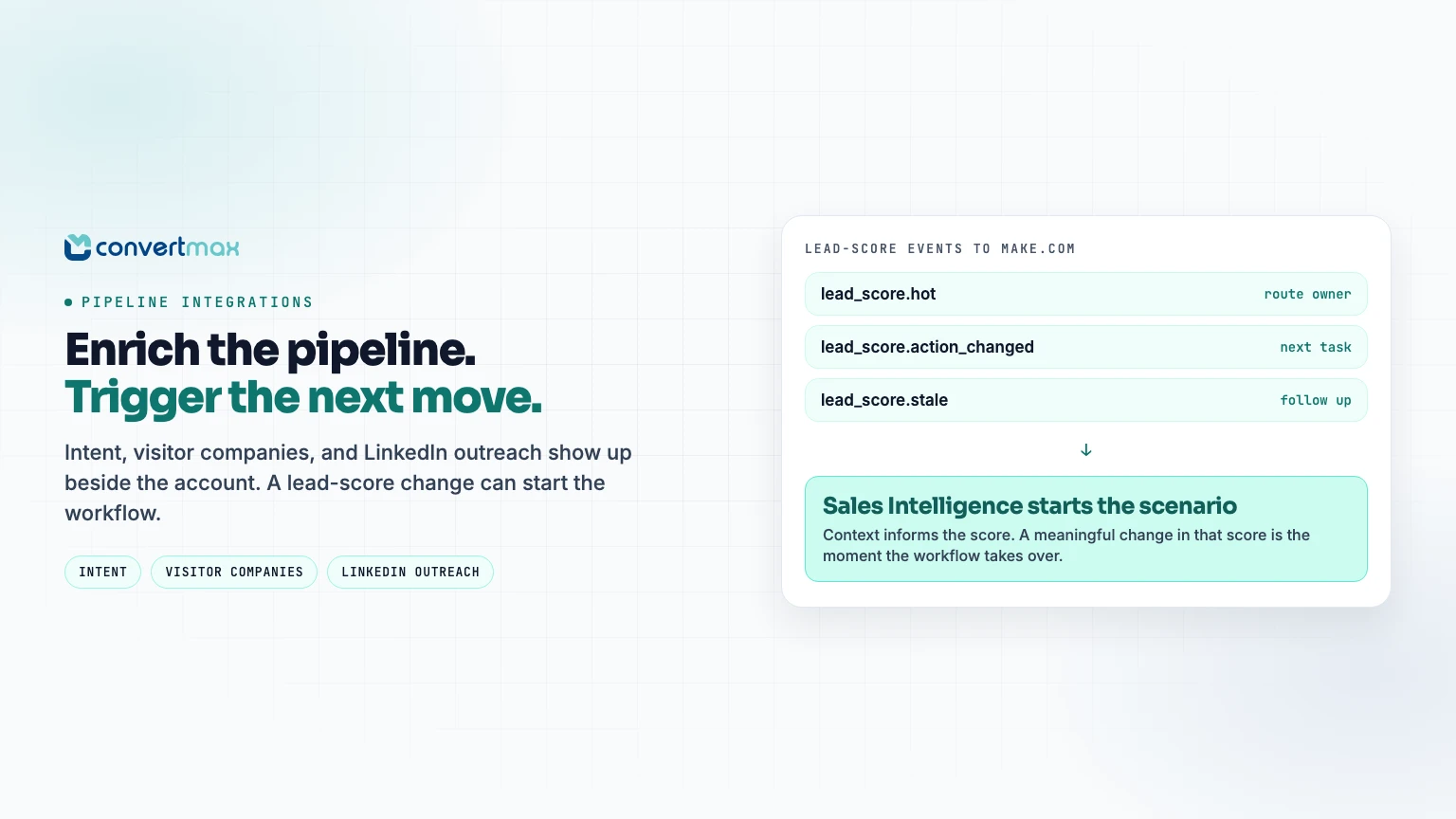
Sales teams do not need more disconnected data. They need the right context at the moment it can change what they do next.
That is the idea behind the latest Convertmax Pipeline integrations. You can now bring intent signals, website-visitor company identification, LinkedIn outreach activity, and prospect data into Sales Intelligence. When Sales Intelligence detects a meaningful lead-score change, that signal can trigger a Make.com workflow.
The result is a more complete picture of the accounts and people moving through your pipeline, without asking reps to jump between tools or manually piece together activity. It also gives your automation a clearer moment to act: when a lead becomes hot, starts going stale, or needs a different next step.
What pipeline enrichment changes
A CRM record tells you who is in the pipeline. Pipeline enrichment helps explain why now, what is happening, and where a rep should focus.
For example, a high-value account may be researching a relevant topic, visiting your website, or engaging with a LinkedIn outreach sequence. Those signals are more useful when they are visible alongside the account and can inform the next automated or rep-led action.
With these integrations, Convertmax Sales Intelligence becomes a central place to surface that context. Teams can then use lead-score changes to drive the Make.com scenarios that matter to their motion.
New Pipeline integrations
Demandbase: account and person intent alerts

Connect Demandbase to bring account and person intent alerts into Sales Intelligence.
Intent can help sellers understand which accounts or contacts may be showing interest in relevant topics. Rather than treating intent as a separate dashboard to monitor, teams can view those alerts in the same sales-intelligence workflow they use to prioritize outreach.
Use Demandbase intent signals to help answer questions such as:
- Which accounts are showing renewed interest?
- Which people may be worth prioritizing for follow-up?
- Where should a rep spend the next block of prospecting time?
MoltSets: identify the companies behind website visits

Connect MoltSets to add company lookups for website visitor IPs in Sales Intelligence.
Website traffic becomes far more actionable when you can understand which companies are behind the visits. This gives sales teams another useful layer of account context, particularly when a known target account is spending time on your site.
With MoltSets data available in Sales Intelligence, teams can connect website activity with the rest of the signals already associated with an account.
Needle: LinkedIn outreach events

Connect Needle to bring LinkedIn outreach events into Sales Intelligence.
LinkedIn outreach is often an important part of an outbound motion, but the engagement it generates can sit outside the systems that sales teams use to manage pipeline. By making those outreach events visible in Sales Intelligence, Convertmax helps teams see a broader view of engagement around an account or person.
That context can support better timing, cleaner handoffs, and more relevant next steps.
Sendler: LinkedIn outreach events

Connect Sendler to bring LinkedIn outreach events into Sales Intelligence.
Like the Needle integration, Sendler allows teams to incorporate LinkedIn outreach activity into the sales signals they use to understand engagement. Reps and operators can see LinkedIn events alongside other account and person context rather than treating outreach activity as a separate source of truth.
ScrapeLi: prospect data

Connect ScrapeLi to bring prospect data into Sales Intelligence. Requires the Sales Intelligence add-on.
ScrapeLi builds prospect lists from competitor LinkedIn audiences, including company-page followers, Sales Navigator searches, and group members. Bringing that data into Sales Intelligence puts names, titles, and company context alongside the account and person signals reps already use to decide who to work next.
Automate Sales Intelligence signals in Make.com GTM
The value of enrichment is not only visibility. It is being able to act consistently when a lead's sales-intelligence status changes.
With Watch Convertmax Events in Make.com, the Sales Intelligence add-on can send the following lead-score signals into a scenario:
- `lead_score.updated` when a lead's score or tier changes.
- `lead_score.hot` when a lead newly becomes hot.
- `lead_score.warm` when a lead newly becomes warm.
- `lead_score.tier_dropped` when a lead drops from hot to warm.
- `lead_score.action_changed` when the recommended next action changes.
- `lead_score.stale` when inactivity crosses the workspace threshold.
These events give your GTM workflows a meaningful sales moment to respond to. A lead becoming hot, going stale, or receiving a new recommended action can be the point where a Make.com scenario takes over.
Make gives sales and marketing teams a visual way to connect the systems around the pipeline. A scenario can work across CRM, email, scheduling, call-recording, contract, advertising, social, analytics, and content systems. With routers, filters, field mapping, and error handling, teams can turn one Sales Intelligence event into the right next sequence for the lead, owner, and campaign.
For example, a `lead_score.hot` event can route a high-priority lead to the right owner, update the CRM record, and notify the team in its chosen channel. A `lead_score.action_changed` event can align the next sales task with the latest recommendation. And a `lead_score.stale` event can start a follow-up process before an otherwise promising opportunity is left idle. The specific actions depend on the tools and GTM motion connected to your Make account.
This is where pipeline enrichment becomes useful beyond reporting. Intent, visitor-company, LinkedIn outreach, and prospect data help inform Sales Intelligence; its lead-score events then give your go-to-market automation a clear, timely trigger.
CRM stage changes, won and lost opportunities, booked appointments, and conversions are also available as separate signals through the same Make connection. Those pipeline signals do not require the Sales Intelligence add-on; the lead-score signals above do.
For the full event setup, see the Sales Intelligence automation documentation. To explore the broader workflow possibilities, see Make's sales automation and marketing automation capabilities.
Give reps context, and give workflows a signal
Sales Intelligence helps reps understand where to focus. Pipeline enrichment adds account and activity context to that view. Make.com automation lets your process react when Convertmax identifies a meaningful change.
The same Sales Intelligence data is also available in Ask Max when the add-on is enabled. Teams can ask pipeline and lead questions such as which deals are stuck, which leads need follow-up, or who has the highest score.
Build a more connected sales motion
Sales Intelligence should help teams decide where to focus. Automation should make it easier to act on that decision. These new Pipeline integrations, paired with lead-score events in Make.com, connect the two.
If your team uses Demandbase, MoltSets, Needle, Sendler, or ScrapeLi, connect the integration in Convertmax to start bringing those signals into Sales Intelligence and your automation workflows.
Ready to enrich your pipeline? Connect your integrations in Convertmax.
Disclosure: some links in this post are affiliate links. If you sign up through them, we may receive a commission or other offer at no extra cost to you.